84% of people say a brand's video convinced them to buy. So, adding high-quality videos to your marketing strategy will surely boost your customer conversion rates.
In this article, we will help you find the best AI video generator for your business, breaking down essential AI features to look for, comparing prices, and how well they work with other tools. We will also share real-world examples to help kickstart your video marketing strategy.
4 Core Criteria When Selecting The Best AI Video Generator
When choosing an AI video generation platform, think closely about your video creation needs. Use these criteria to help identify which features matter most for your projects.
1. Use Built-in Or External Video Editor
Some AI video generators offer built-in video editors for convenience. You don't need to switch platforms to create videos and provide a fast, all-in-one solution. It's a practical option for creating videos for short and simple projects like social media videos, basic tutorials, and company presentations.
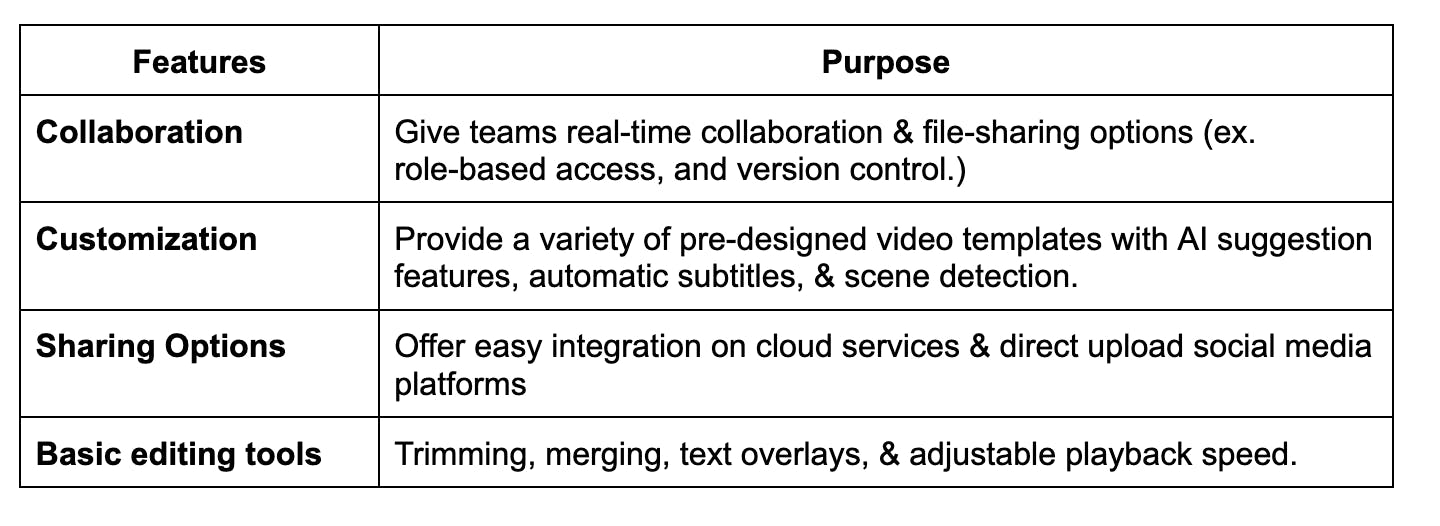
If you choose a built-in AI video editor, here are the features you should look for in an AI video generator:
On the other hand, an external video editing tool offers more advanced features. This gives you more control over the final look and feel of your video. If you plan to use your own editing software, make sure the AI video generator lets you easily export your work.
- Supports high-resolution exports (at least 1080p or 4K video)
- Accept aspect ratios for widescreen (16:9), square (1:1), vertical (9:16), etc.
- Have an option to export audio tracks separately (voiceovers, background music, or sound effects)
- Provide plugins or direct integration with editing software like Adobe Premiere Pro or Final Cut Pro
Whether you use built-in or external video editors, make sure they come with proper licensing. This will help protect your business from copyright infringement. It's a must to read their terms of service and check their respective pricing plans for any restrictions. You can also reach out to customer support if their licensing terms are unclear.
2. Choose An AI Video Generation Tool With Realistic Avatars
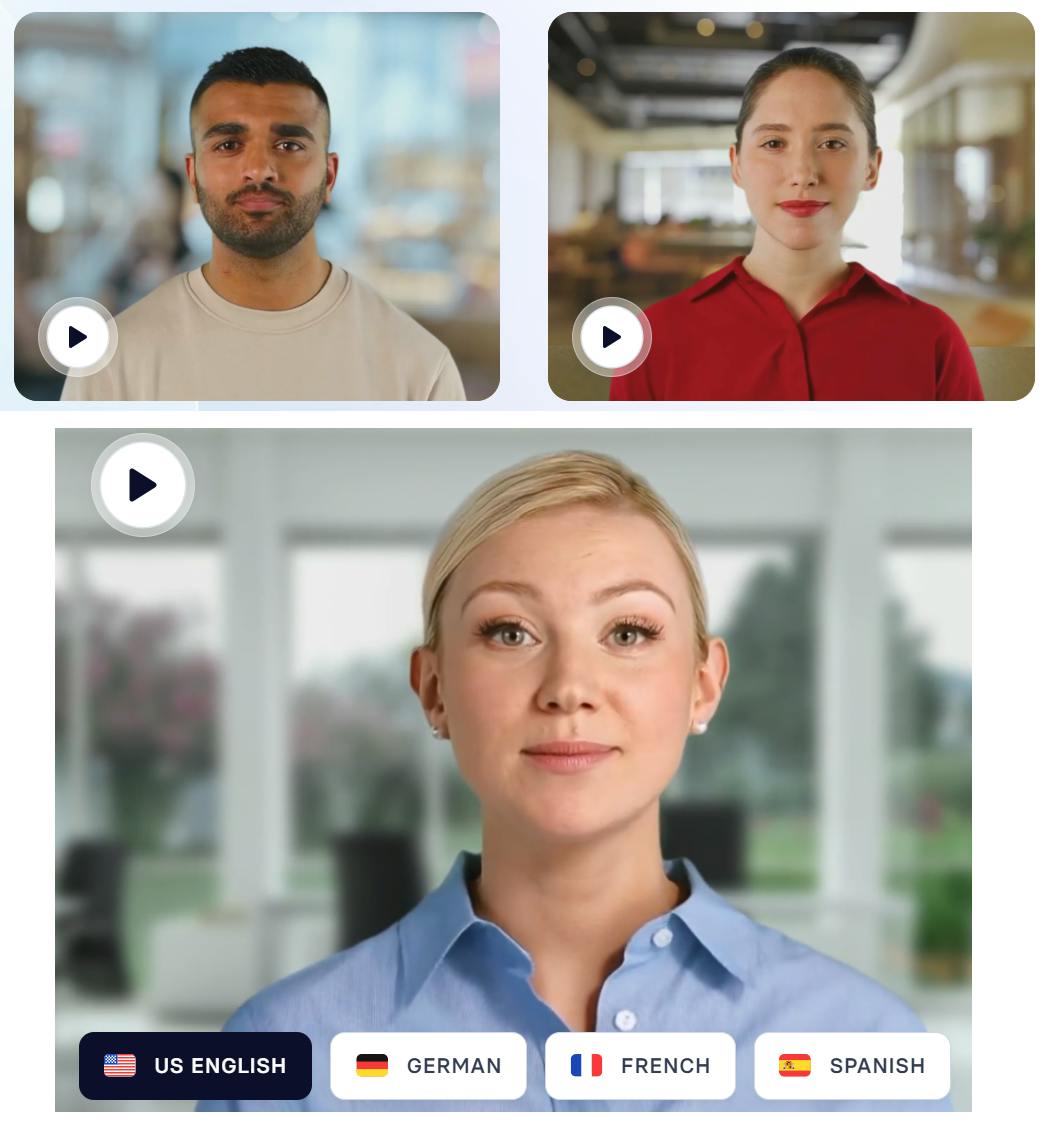
Half of Gen Z viewers prefer AI avatars, and it’s easy to see why. Realistic AI avatars make videos more exciting, relatable, and unique. They can also represent different cultures, languages, and styles—perfectly aligning with Gen Z’s values of diversity and inclusivity.
When looking for an AI video generator with AI avatars, check if the avatars look and behave naturally. The more realistic the avatar, the more engaging your videos will feel. So, explore the AI tool's features and see if it offers realistic facial expressions, human-like gestures, and smooth lip-syncing with speech.
Here are popular video generation platforms with reliable AI avatar generators.
2.1 Heygen
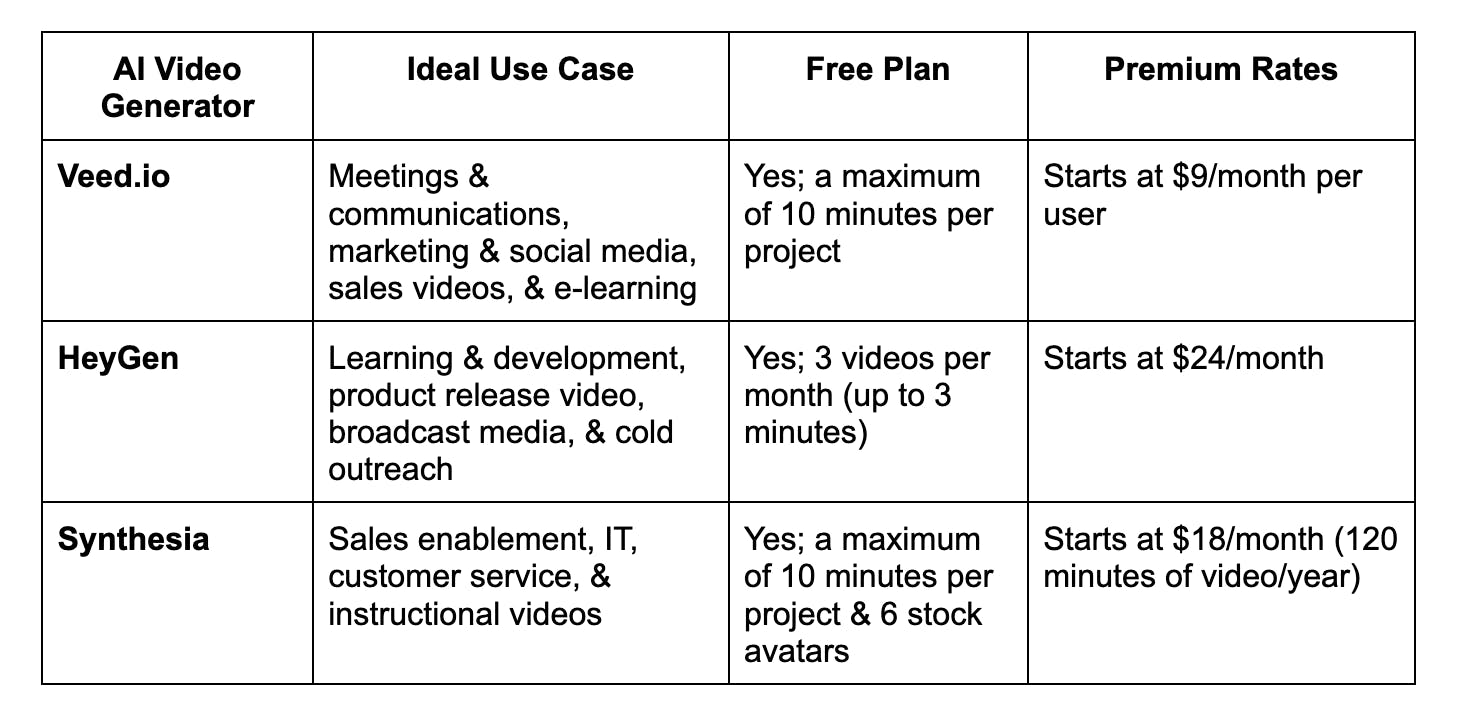
HeyGen creates AI avatars of diverse ethnicities, ages, and styles. It also offers interactive avatars that can start natural conversations with your customers, making them ideal for support, sales, or coaching.
2.2 Synthesia
Synthesia offers different types of AI avatars—a stock, personal (your digital twin), or studio avatar. You can make it speak over 140 languages in various voices. You can also use their AI text-to-video to instantly convert your script to video.
2.3 Veed.io
Veed.io offers 50+ digital actors, 30 templates, and 75+ languages to help you create a custom AI avatar. It includes auto subtitles, Text-to-Speech, and removal of background noise.
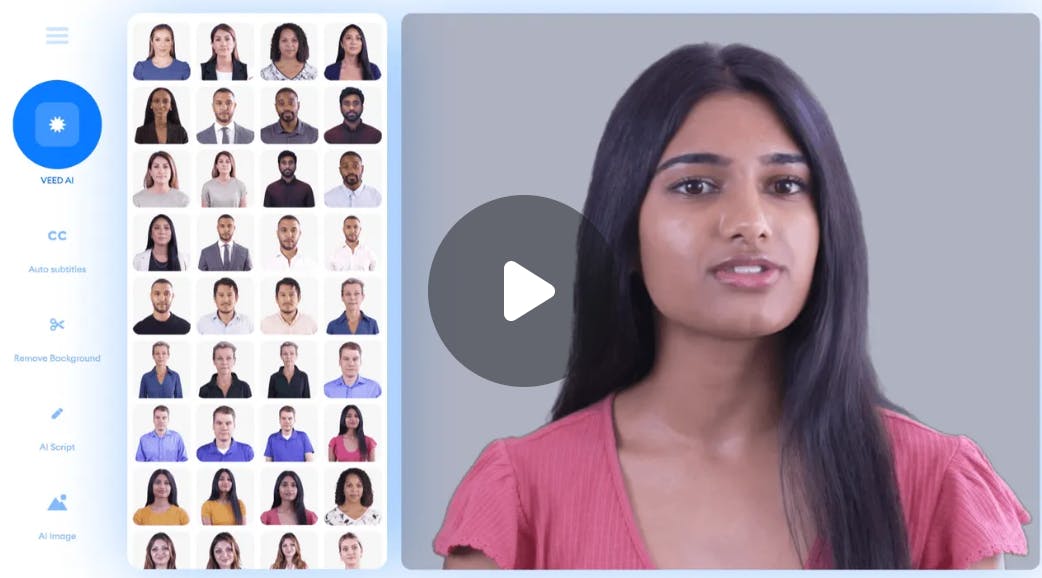
Here's a quick comparison of the 3 AI video generators to help you decide which one to choose.
3. Offer Different Styles Of AI Video
An AI video generator tool offers different styles to match various industries and projects. Check if they have the video style you want for your project.
If you don't have a specific video idea in mind, focus on your goal. Are you trying to promote a product or explain a concept? Understanding your goal will help you choose the right style. Check out these popular AI video styles and their uses to help you decide.
3.1. Talking Head Videos
A talking head video is when a person speaks directly to the camera, with only their face and shoulders visible. The speaker's goal is to convey a clear message without distractions. This is why a talking head video is helpful for a consulting business. It allows consultants to clearly:
- Offer advice
- Share valuable insights
- Explain complex concepts
This is exactly what Dr. Michael Warren, founder of Transitions Elite, does when explaining how business owners can maximize the value of their veterinary practice.
Showing confidence, openness, and warmth helps you connect with your audience. But it isn't enough to engage them fully. So, Dr. Warren uses his whole body to show positive body language to make his message stronger and seem more approachable.
Here are other best practices he did when filming the video:
- Use soft lighting
- Excellent sound and video quality (720p)
- Use a cozy background and comfortable seating
- Keep it short (1 minute and 54 seconds) and engaging
How AI Video Generators Can Improve Talking Head Videos
An AI video generator becomes handy when you don't want to appear on camera. It can help you create a lifelike avatar of you or pick a stock avatar. Simply input your script and the AI will speak to your audience with natural expressions and gestures.
3.2 Interview-Style Videos
An interview-style video often features 2 or more people, where one asks questions and the other shares their expertise and experiences. The interviewee’s goal is to share valuable insights to educate or inform the audience.
As remote work's popularity increases, businesses use this video style to simulate job interviews. They create a series of pre-recorded videos to showcase:
- A list of interview questions and ideal responses
- Essential qualities they value in potential candidates
- Cite different interview scenarios and how to handle them
- Expert advice for handling challenging interview questions
Somewhere, a headhunter agency is a successful brand that uses interview-style videos to highlight its talent pool. This video encourages employers to see that top talent can come from anywhere, not just within their location.
Here are the best practices the brand followed when filming the video:
- Use clear audio and professional editing to ensure it reflects the agency’s brand reputation
- Focus on both candidates and employers sharing their expertise and experiences to make it relatable and authentic
- Highlight key takeaways: employers' challenges to hire the top talents and how the agency makes the process easy
How AI Video Generators Can Improve Interview-Style Videos
An AI video generator improves both audio and video quality. It adjusts lighting to remove shadows on the face, highlighting the speaker's facial expressions. It also cuts background noise so the audience can focus on the message.
Our voices can sometimes show too much emotion. AI can adjust the speaker's voice to keep it lively and engaging.
3.3 Illustrated Videos
An illustrated video is a style that makes professional videos fun and easy to understand. It uses storytelling techniques to explain a concept or showcase a product, paired with relevant visuals like drawings, graphics, or animations to support the message. The goal is to make complex ideas simple and engaging.
Since the beginning, Dropbox has used this style for its series of explainer videos. They use clear, engaging visuals and approachable voice narration to help their audience understand the benefits and features of their platform.
Dropbox successfully delivers this video style as it appeals to both the logical and emotional sides of its audience. It emphasizes the product's benefits to engage the logical side and shows how it solves a problem to connect emotionally.
How AI Video Generators Can Improve Illustrated Videos
AI video generators can adjust the visuals based on your target audience’s characteristics and needs. All you need to do is input your audience preferences and AI will adjust the animation style, colors, and other visual elements. They also enhance video quality by:
- Sync animations, sound effects, and voiceovers
- Remove visual distortions and clean up the audio
- Adjust animation fluidity to ensure transitions and movements are seamless
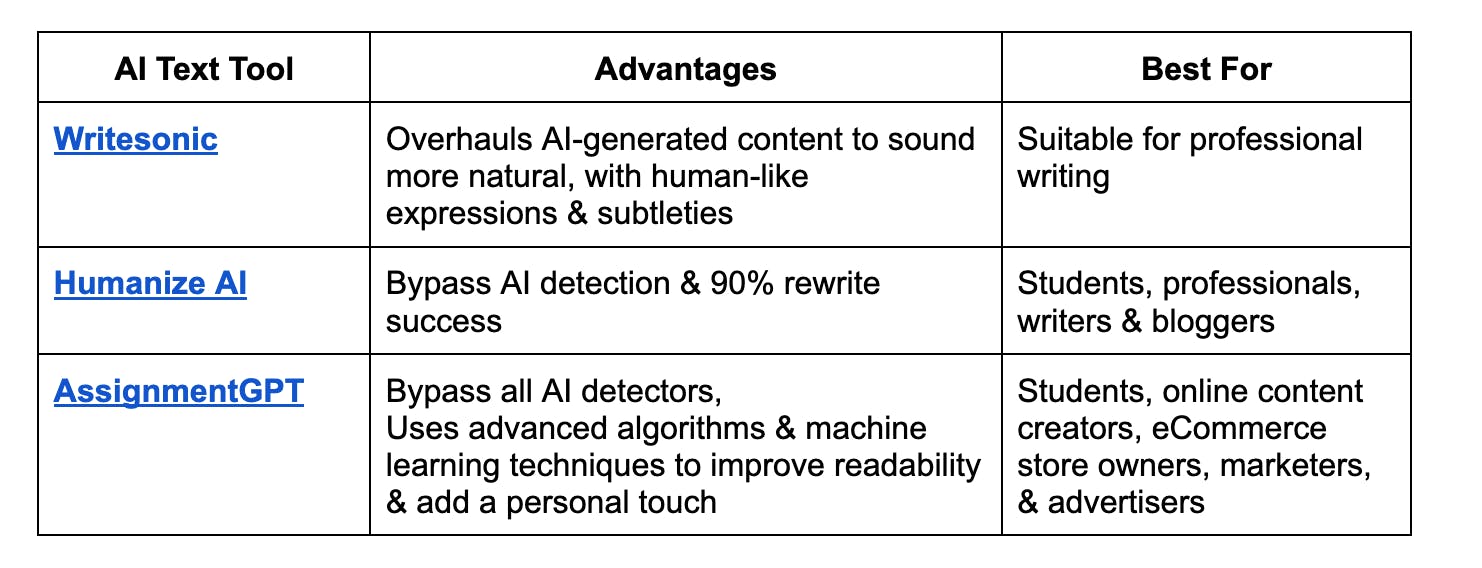
You can also use their AI script writer to improve your story. It will provide a compelling, concise, and impactful narrative. If you feel the content they generated sounds unnatural or stern. Here are a few proven AI-to-human text converters to refine and personalize your script.
4. Explore Integration Options
Aside from video editing software, an AI video generator can integrate with several business systems and tools to improve how it functions. Pick the one that best supports your goals. Here are the popular systems and tools that AI video generators often work with:
4.1. Text-to-Speech (TTS) Systems
66% of marketers say videos with a voiceover get better results because combining visuals and narration helps convey the message clearly. This makes AI-generated videos much easier to follow and remember.
Some AI video generators, like Pictory and Invideo, include a built-in TTS system. If you already have one, pick one that lets you integrate it easily. Here are popular TTS systems that work so well with AI video generators:
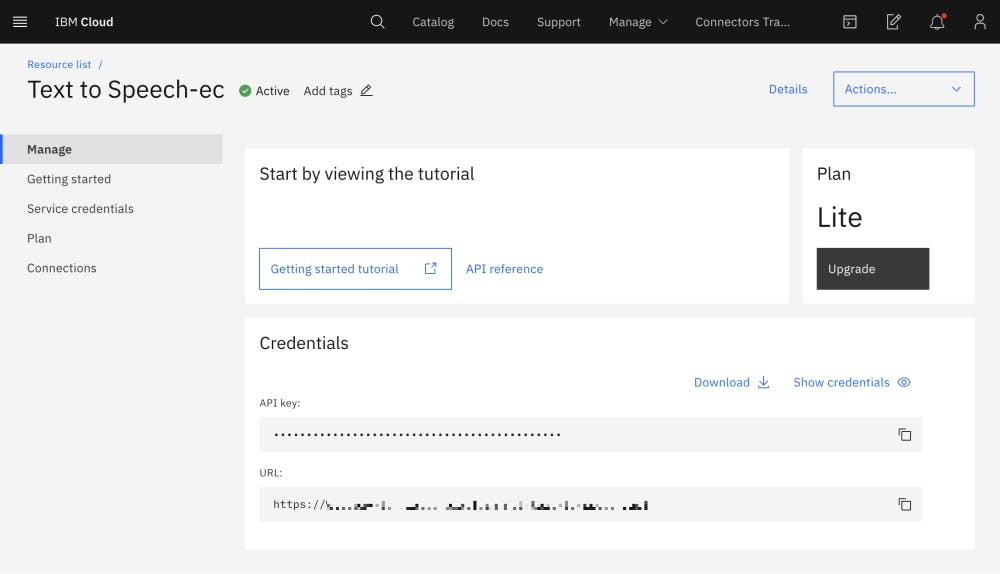
- IBM Watson: It's an API cloud service that lets you create natural-sounding, professional voiceovers. It includes tools to personalize pronunciation, speaking style, and voice quality.
- DialMyCalls: It's a 2-way SMS app with a text-to-speech conversion tool. It can also deliver clear, professional voiceovers ideal for marketing content and explainer videos in just a few clicks.
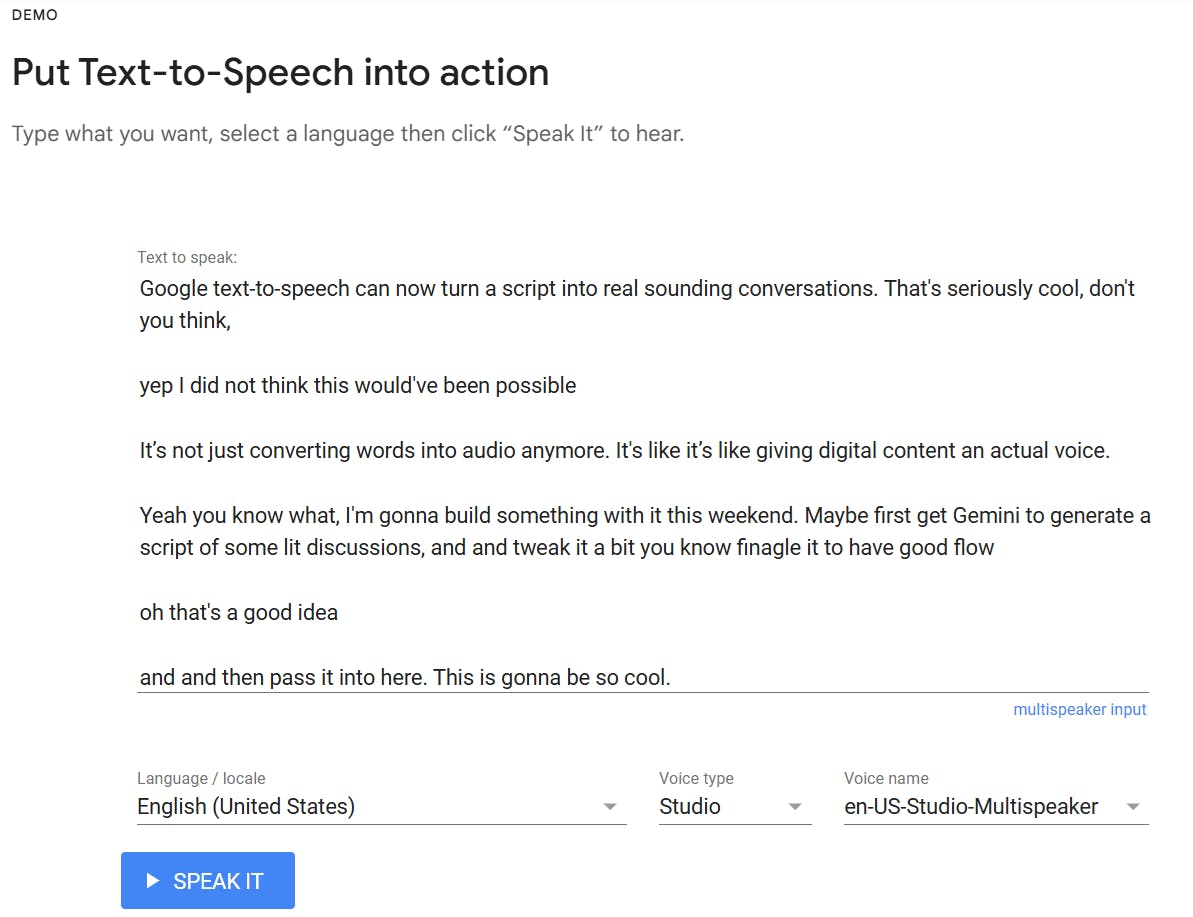
- Google Text-to-Speech: The simplest TTS API to integrate. It offers 380+ realistic voices and supports over 50 languages.
4.2 Content Management Systems (CMS)
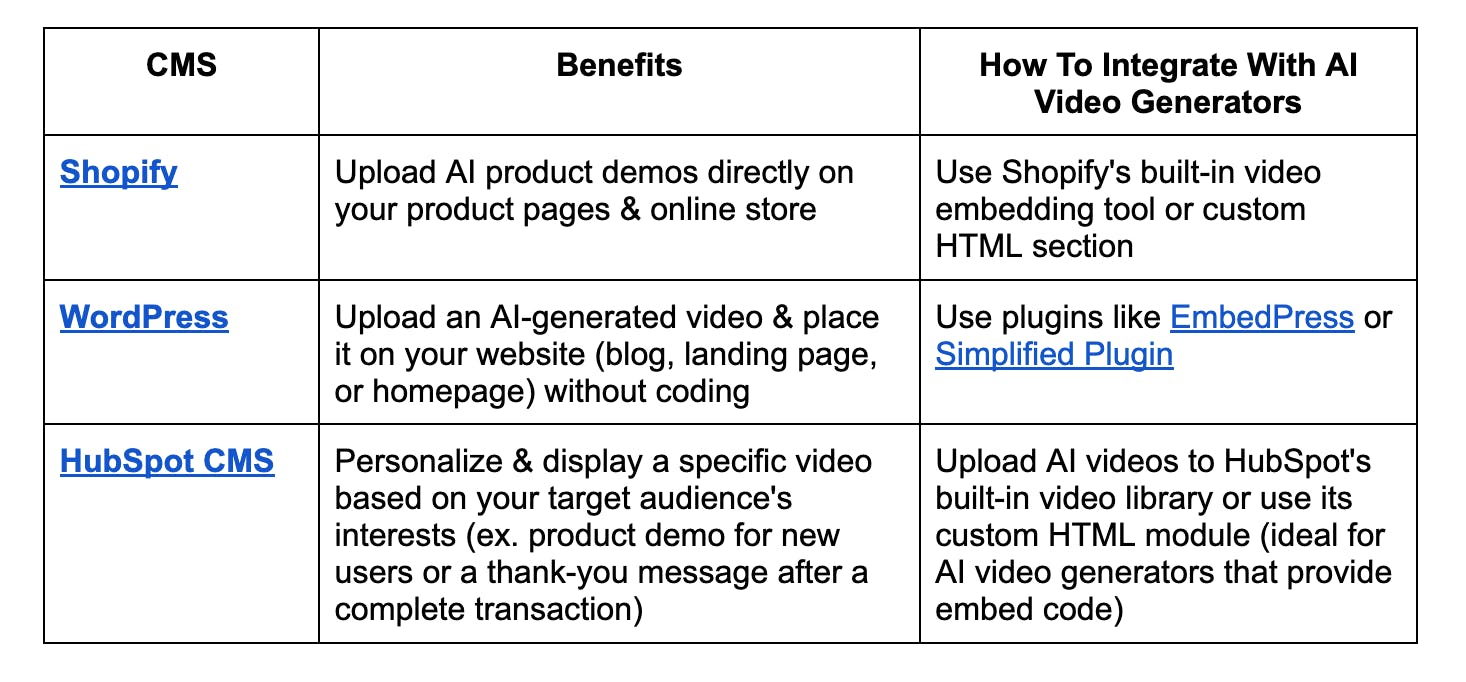
Combining a CMS with a great AI video generator helps you manage, publish, and share your AI videos across your website and other online platforms. You can enjoy even more benefits, but it will depend on the type of CMS you choose.
4.3 Marketing Automation Platforms
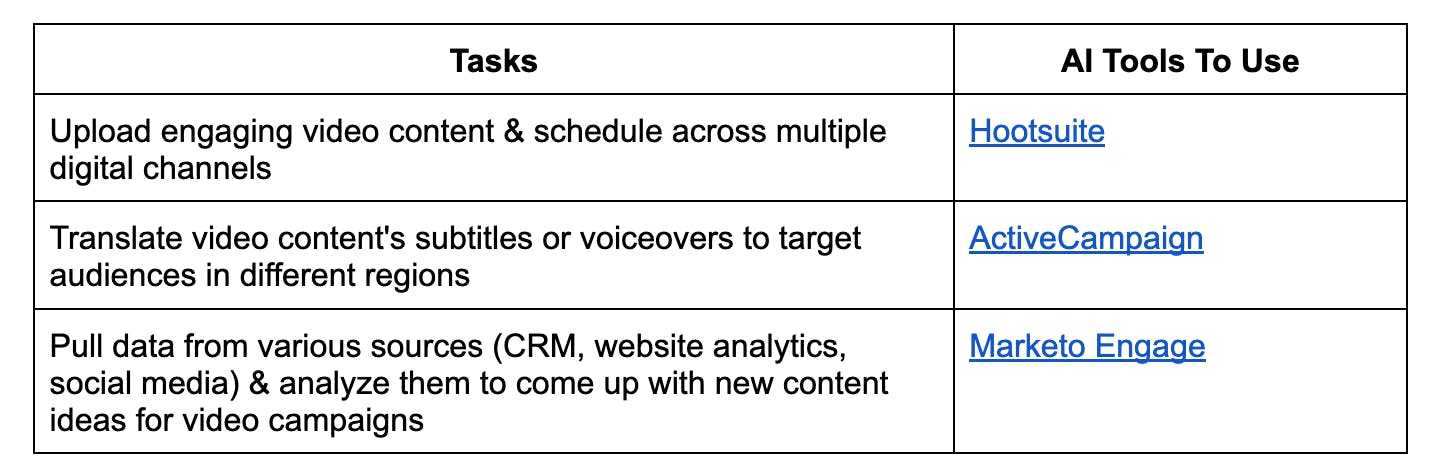
60% of marketers say AI helps them with their daily tasks. Marketing automation plays a major role in making this happen. As a standard, it automates repetitive manual tasks like selecting video templates. Let's say you are creating a promotional video, this AI tool will help you pick a video template designed to highlight a specific product or offer.
It can also assist you to perform basic editing tasks. It can automatically add transitions, crop videos for social media dimensions, or overlay captions. Here are other tasks it can automate efficiently.
3 Best AI Video Generators To Create Impactful Brand Videos
If you're looking for more, here's a comprehensive list of the best AI video generators. We highlight their unique strength, ideal use cases, and pricing rates to help you make an informed decision.
I. Runway
Best For: Text-to-video feature and hyper-realistic renders
Runway is an excellent AI video generator for marketers and content creators who want to experiment with various narratives or video concepts. One of its strongest points is its text-to-video feature. Write a simple and direct prompt that describes your desired action, and it will bring your artistic vision to life.
With its new Gen-3 Alpha, Runway advises you to follow this structure [camera movement]: [establishing scene]. [additional details]. This structure provides separate sections for the details about the scene, subject, and camera movement; helping you get consistent results.
Runway also helps you generate hyper-realistic renders through these features:
- Expressive characters with a wide range of actions, gestures, and emotions
- Fine-grained temporal control for smooth transitions and precise key-framing of elements in the scene
- Generative Visual Effects (GVFX) to turn still video clips into complex effects (ex. animation or simulations)
Runway Ideal Use Case
One practical application of Runway's text-to-video feature is product showcases. You can generate videos highlighting your product's key features or benefits to set clear expectations for your customers. Here's a sample prompt for a 3D model of a grey couch.

Runway Pricing
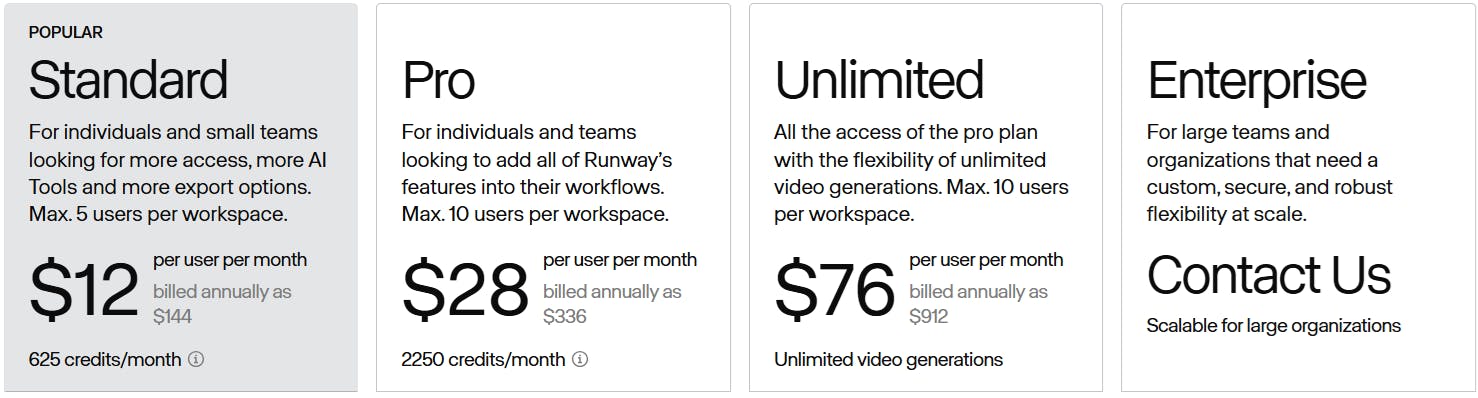
You can get started with Runway's free AI video generator. It gives you 125 one-time credits, which is ideal for familiarizing yourself with their AI-powered tools and content creation features. If you want to access more, you can choose any of the pricing plans.
II. Elai.io
Best For: Avatar-based training videos
Elai is a great choice for businesses and educators who want to transform their presentation data, slides, or scripts into engaging, professional training videos. Simply select 'Create a new video' and upload your PowerPoint or PDF file. Click 'Create video' and your presentation will transform into video slides with editable elements.
Here are the elements you can add to complete your video:
- Royalty-free music
- Interactive animations
- Voice-over option (450+ accents)
- Clone your voice in 28 languages
- Translate your video content in 75+ languages
- 80+ avatars to choose from (selfie, studio, photo, or animated mascot)
- Stock media library (stickers, images, GIFs, stock footage, and Lottie)
If you're creating software demos or tutorials, use its screen recording feature. It helps you capture your software in action and every detail of its process workflow.
Elai.io Ideal Use Case
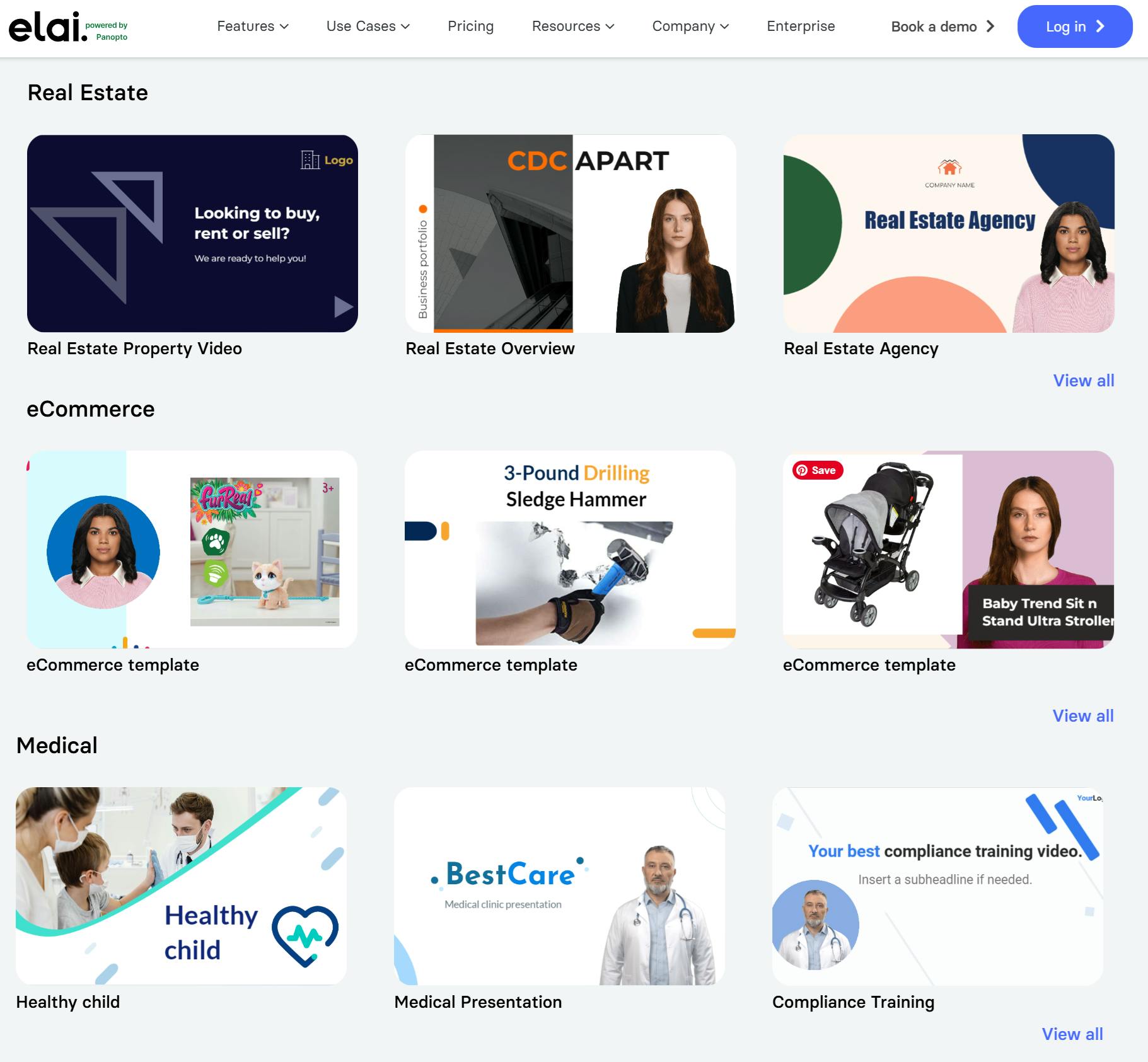
Elai's AI video generator is popular for creating corporate communications, e-learning, and marketing videos. However, it isn't limited to these areas. It also offers customizable video templates so that you can create your personalized video based on your niche.
Elai.io Pricing
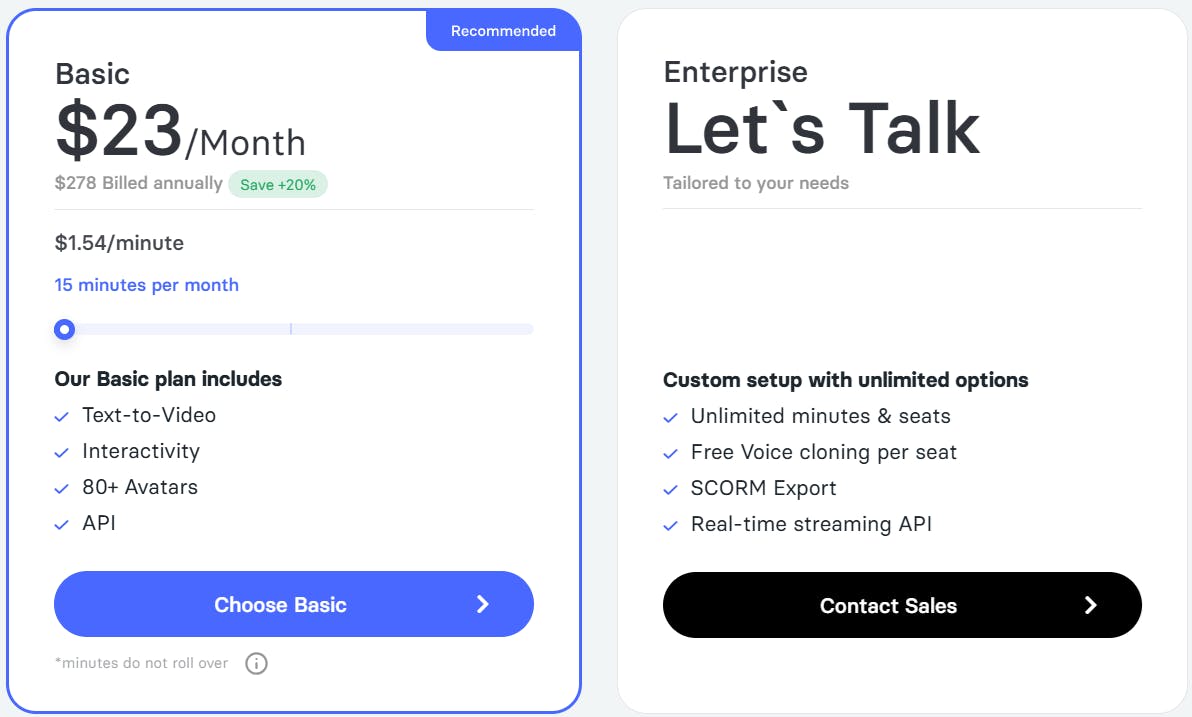
Elai offers a free version where you will get a 1-minute video credit. This is an ideal choice if you're just getting started with AI video creation. The free plan lets you create 3 slides per video and choose from 300+ standard voices. If you need more creative flexibility, you may consider the other 2 pricing plans.
III. Fliki
Best For: Turning product listings into engaging videos
84% of consumers are more motivated to buy after watching a video. It engagingly presents the products, showcasing how they work and what they look like in real life. Fliki makes it easier for sellers to turn their Amazon or Airbnb product listings into dynamic videos.
Click the 'Product to Video' option and paste the link to your chosen product page. Fliki will automatically generate a script based on the product's information. Then, choose and personalize a voice (81 languages and 116 dialects) that best suits your video.
If you don't want to create from scratch, Fliki offers a variety of video templates. Each template includes placeholders for images, text, and other branding elements; making it easy to customize and align with your specific needs. Once you're satisfied, export your videos in formats like MP4 and MOV and place them on your blog, ad campaigns, or social media channels.
Fliki Ideal Use Case
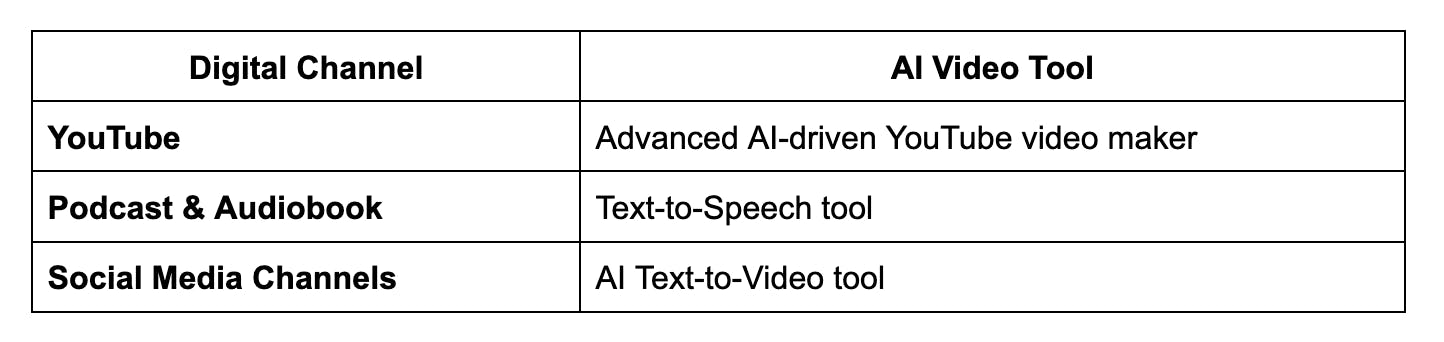
Fliki is also an excellent AI video tool to increase engagement and reach a wider audience. It offers a video maker and tools specifically designed for various digital channels.
Fliki Pricing
To explore Fliki, sign up for its free plan. It includes 5 minutes of credits per month and access to all its AI video creation features. If you require additional features or need more credits, pick one of their premium plans.

Best Non-AI Video Tool
Bonjoro Video Messaging
Best For: Sending human-made video emails at scale
AI video generators are exceptional for their speed and creative flexibility. But if you want to truly connect with customers on an emotional level, human-generated videos remain unbeatable. Bonjoro makes it simple for you.
Their video messaging feature allows you to record personalized video messages and send them at key moments of your customer journey. This is possible because Bonjoro seamlessly connects with your CRM, either directly or through Zapier. It will automatically trigger a task to create and send a personalized video upon receiving a new lead, signup, or inquiry. Here are a few popular funnels you can create in Bonjoro.
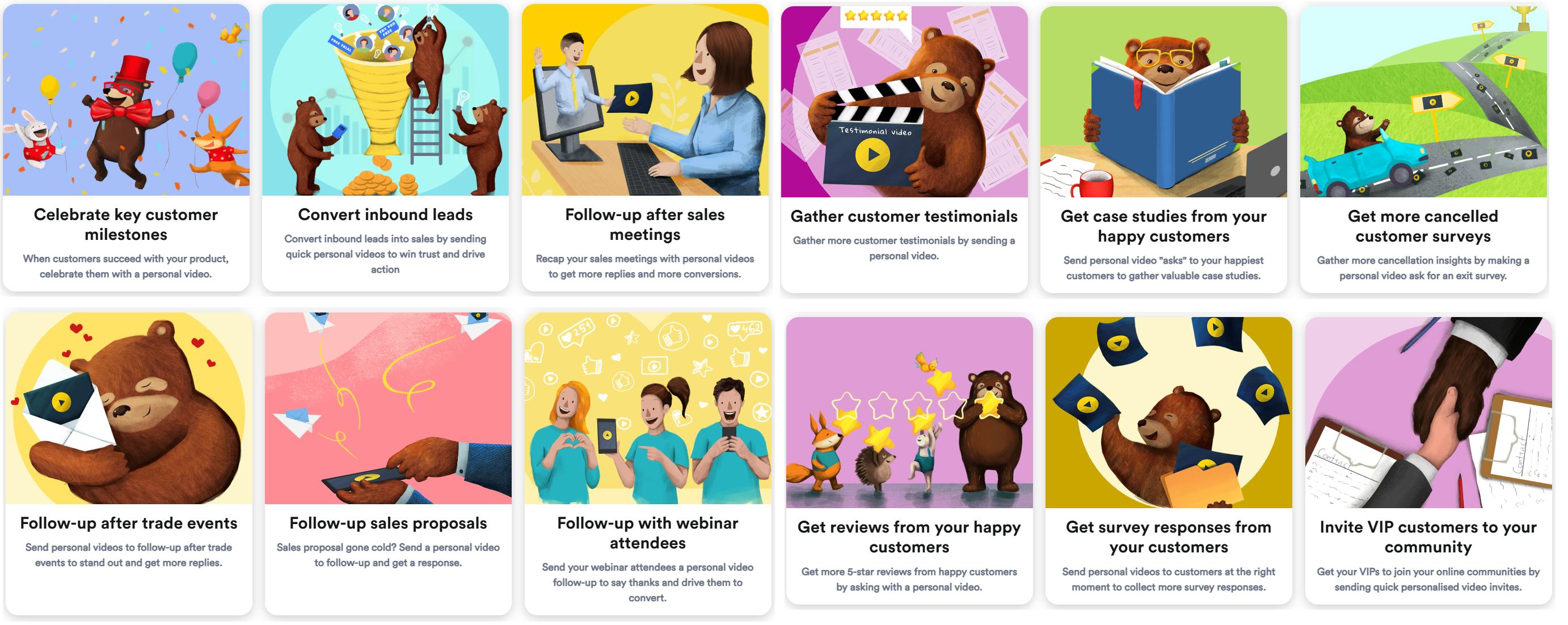
Each funnel includes a sample subject line, message template, and call-to-actions. It will also guide you to pinpoint when to send your videos. You can also build custom video templates to save time and ensure consistency.
Bonjoro Ideal Use Case
Many customers find success using Bonjoro for various reasons. One good reason is building a personal onboarding experience for every customer. Once a new customer signs up, the brand will send them a 1:1 welcome video to ensure you will make a great first impression. It includes clear CTAs and embedded walkthrough videos to guide them on the next steps.
You can replicate its success for the following tasks:
- Follow-up messages for new leads or inquiries
- Thank-you videos or asking for feedback to strengthen customer retention
- Personalized video updates about new products and promotions to drive higher engagement rates
Bonjoro Pricing
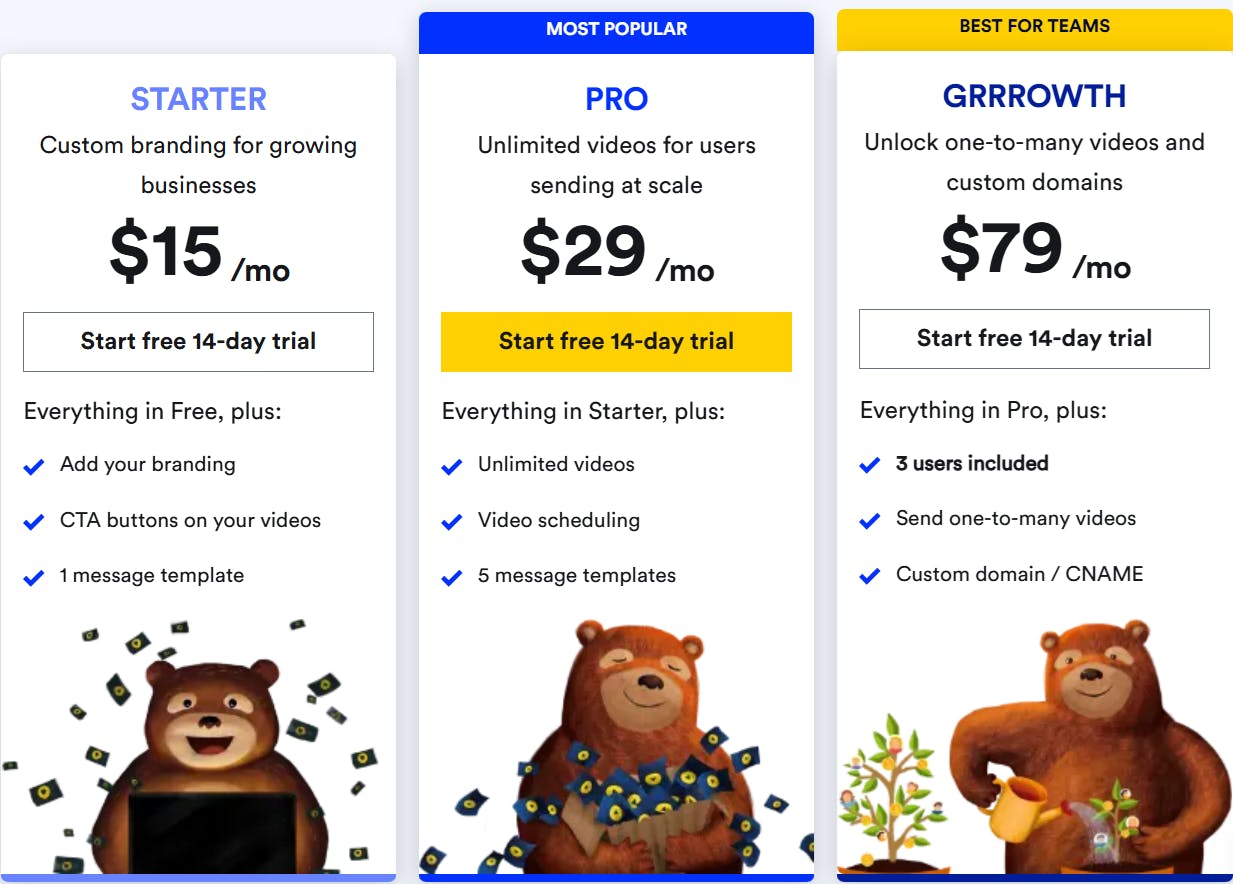
Entrepreneurs and startups can use Bonjoro video messaging for free up to 50 videos. After that point you can get one of their paid plans to unlock custom branding and more included videos - here's the pricing:
Conclusion
Choosing the right AI video generator isn’t just about features or ease of use. Focus on how well it helps you create more meaningful, authentic videos. Before deciding, try them out to see if it meets your goals. Most brands offer a free plan or trial period, test them and see how they work.
Ready to add a personal touch to your videos? Bonjoro can help you personalize and send video messages that feel human and show how you truly care. Visit Bonjoro to start creating real connections.
Author Bio:
Sarah Mitchell is a freelance writer dedicated to producing premium blog content for entrepreneurs and SMBs. Her work helps them streamline their content marketing and you may recognize her name from platforms like Hubspot, Outbrain, Flippa, and many more.