
7 Video Email Tips to Boost Conversions
Video emails can boost your marketing results. Here's how to make them work:
- Write good subject lines
- Use eye-catching thumbnails
- Make videos personal
- Keep videos brief
- Add clear next steps
- Make videos work on phones
- Check results and improve
Quick stats:
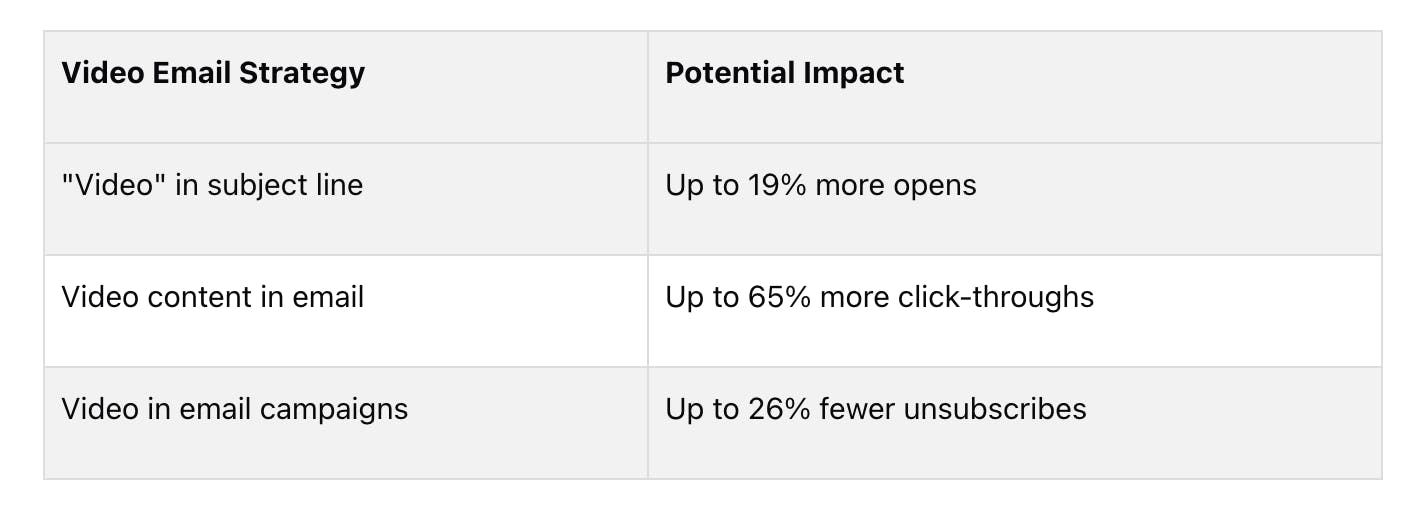
- 19% more opens with "video" in subject line
- Up to 300% increase in click-through rates
- Up to 500% increase in conversion rates with personalized videos
Key takeaways:
- Keep videos under 60 seconds
- Add a clear call-to-action
- Optimize for mobile viewing
- Track and test different elements
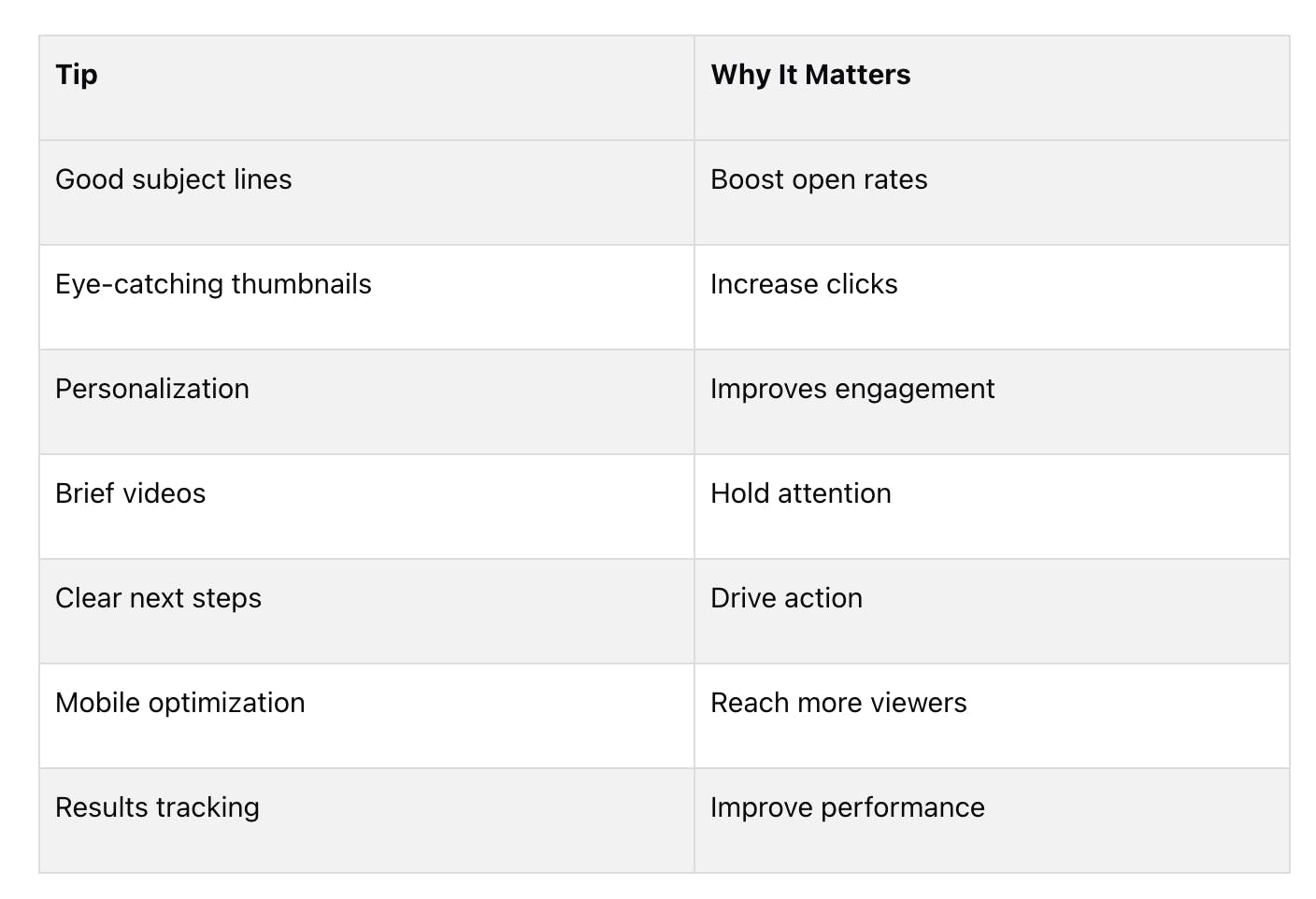
Start with key emails like welcome series or product launches. Track results and adjust based on what works.
Related video from YouTube
Write Good Subject Lines
Your subject line can make or break your video email's open rates. Here's how to craft ones that work:
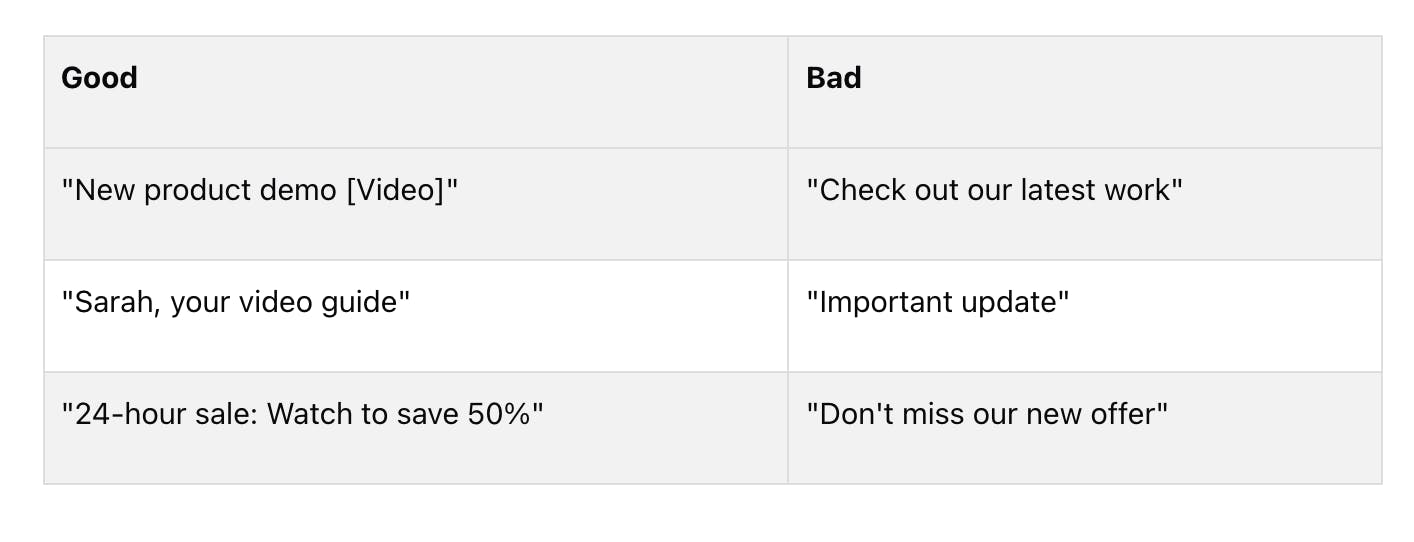
- Add "video": Boost open rates by 19%. It tells people there's something to watch. Example: "New product demo [Video]"
- Keep it short: Aim for 40 characters or less. It'll show up fully on mobile.
- Get personal: Using names can bump open rates by 50%. Example: "John, we made this video for you"
- Create urgency: Make people want to act now. Example: "Limited time: See our video walkthrough"
- Be clear: Tell people exactly what they'll get. Example: "30-second video: How we save you time"
Good vs. bad subject lines:
2. Use Eye-Catching Thumbnails
Your video thumbnail is your first impression. It's your ticket to more clicks. Here's how to make it pop:
- Add a play button: This can boost clicks by 21.52%. It's a clear "watch me" signal.
- Show a friendly face: Smiles sell. A happy face makes your email more inviting.
- Use bright colors: Make it pop in crowded inboxes.
- Keep it clean: One clear message or image. That's it.
- Think small: Most people check email on phones. Make sure it looks good tiny.
- Add a teaser: 4-5 words to spark curiosity. Don't give it all away!
- Try a GIF: Movement catches the eye. In one test, GIFs crushed static images:
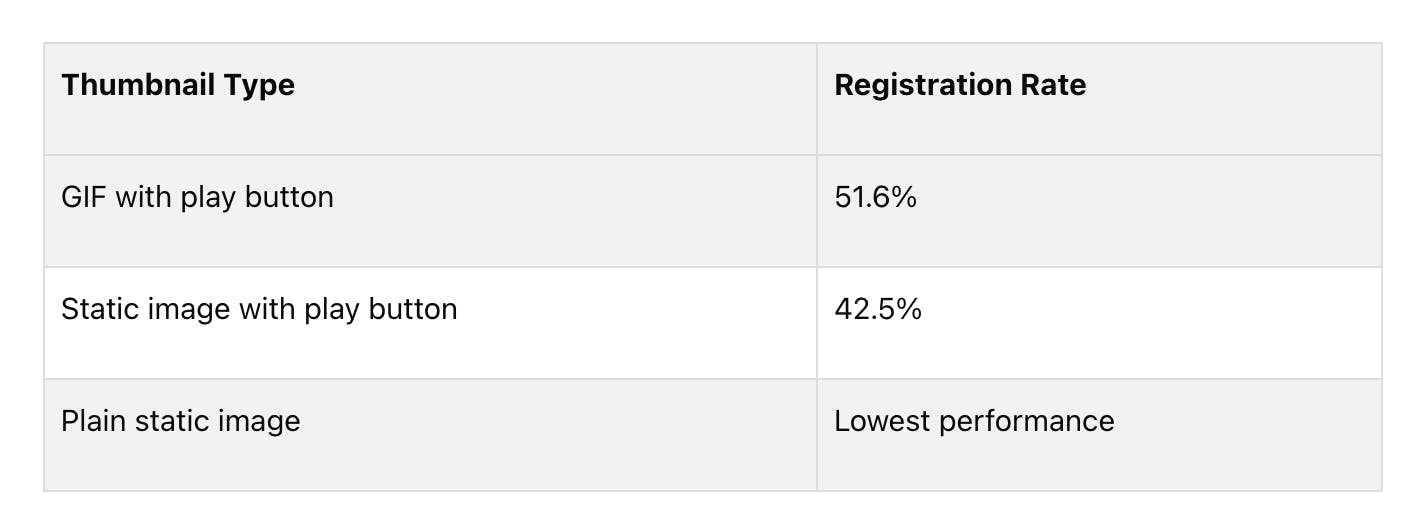
Your thumbnail is a mini-ad. Make it work hard for you.
"If copy is the brains of your email, video is the personality. Users are far more likely to click a play button than they are to read a paragraph of text." - Ruairí Galavan, Content Marketing Manager, Intercom
3. Make Videos Personal
Want your video emails to stand out? Make them personal. Here's how:
- Use their name: Start with "Hey [First Name]!" It's simple, but it works.
- Show you've done your homework: Mention something specific about them or their company.
- Group similar contacts: Send targeted content to people with shared traits.
- Customize visuals: Use images or screenshots relevant to the viewer.
- Speak to their needs: Address their specific problems or goals.
One company tried this and saw engagement jump 26.83% above industry standard. They personalized videos about benefits and compensation for employees.
"Video creates a person-to-person connection because it uses your unique face and voice to share your message, rather than the same black-and-white text that everyone else uses."
The numbers don't lie:
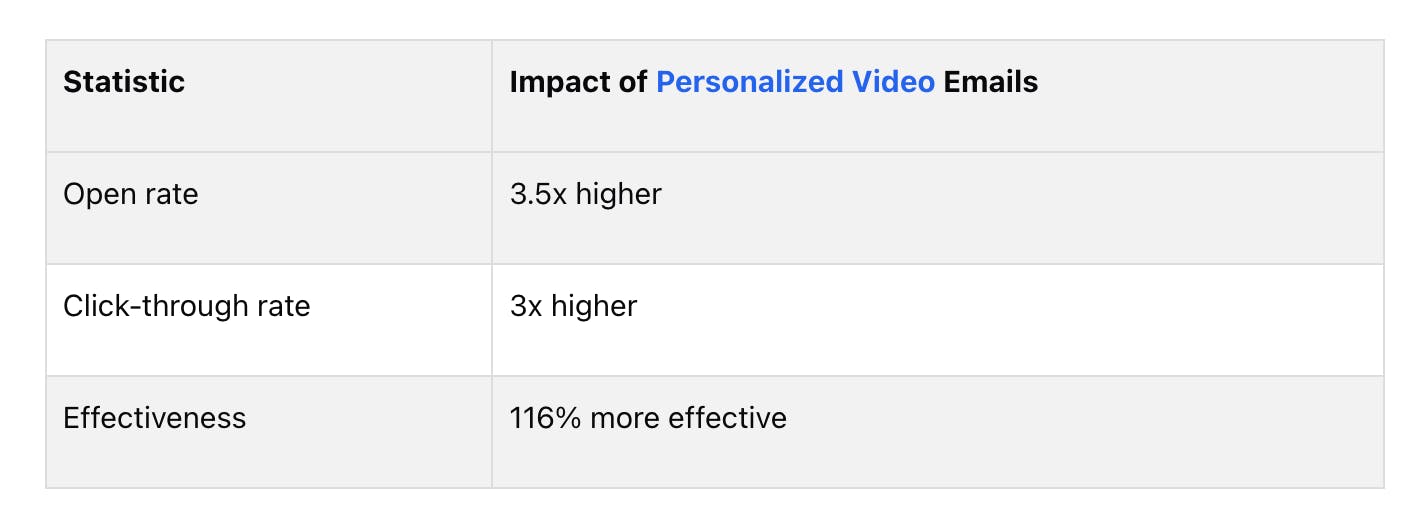
Bottom line: Make each viewer feel like the video was made just for them. Aim for 4-8 personalized elements per video. It's worth the effort.
4. Keep Videos Brief
Short videos win in email marketing. Why? People's attention spans are getting shorter. You need to make every second count.
60 seconds or less is the sweet spot
After one minute, viewer retention drops fast. Check this out:
- Almost half of 2023's videos were under 3 minutes
- 5-minute videos keep about 50% of viewers
- Longer videos? Engagement drops to 38%
How to make short videos that pack a punch:
- Hook them in 5 seconds
- Stick to one main point
- Show, don't tell
- End with a clear next step
Real-world win:
Trivago crushed it with a 15-second ad. The result? 40% higher completion rate than competitors.
"Viewers don't have time for long videos. Keep it short to keep them watching." - Wistia 2023 State of Video Report
When longer works:
Personalized videos can stretch to 70-90 seconds and still engage. For example:
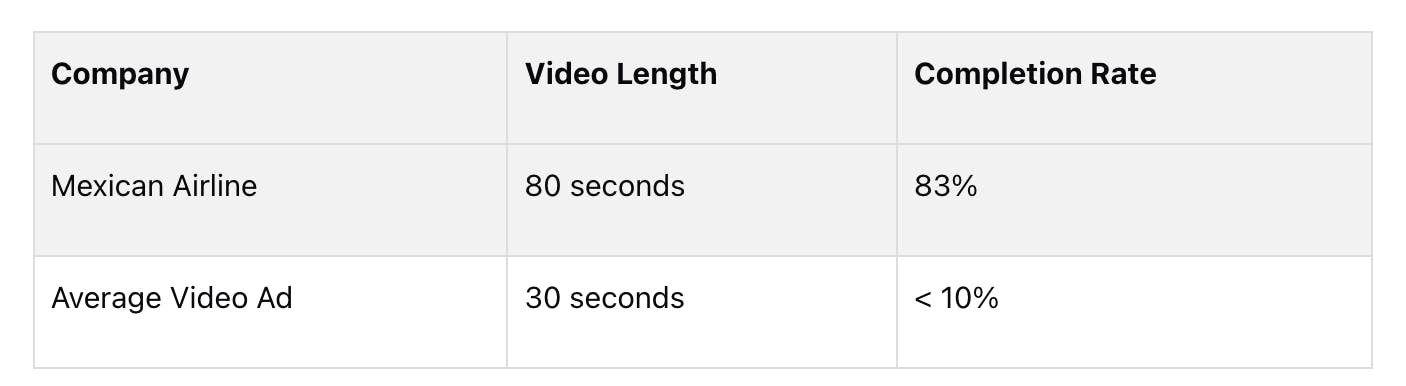
The secret? Make it personal. When viewers feel it's just for them, they'll watch longer.
Bottom line: Deliver value fast. If you wouldn't watch it all, don't expect others to.
5. Add Clear Next Steps
Your video email won't convert if viewers don't know what to do next. So, let's make it crystal clear.
Here's the deal: You need a strong call-to-action (CTA). It's your viewer's roadmap to the next step.
Where to put your CTA?
Simple:
- At the video's end
- In the email body
- As an overlay on the video
Keep it simple, stupid
One main CTA. That's it. Why? Multiple options = confused viewers = lower conversion rates.
Action words are your friends
Start your CTA with punchy verbs:
- "Get"
- "Shop"
- "Discover"
- "Save"
Light a fire under them
Make them act NOW:
- "Limited time offer"
- "Only available today"
- "Last chance to save"
Make it personal
Your CTA should fit your video and your audience. Like this:
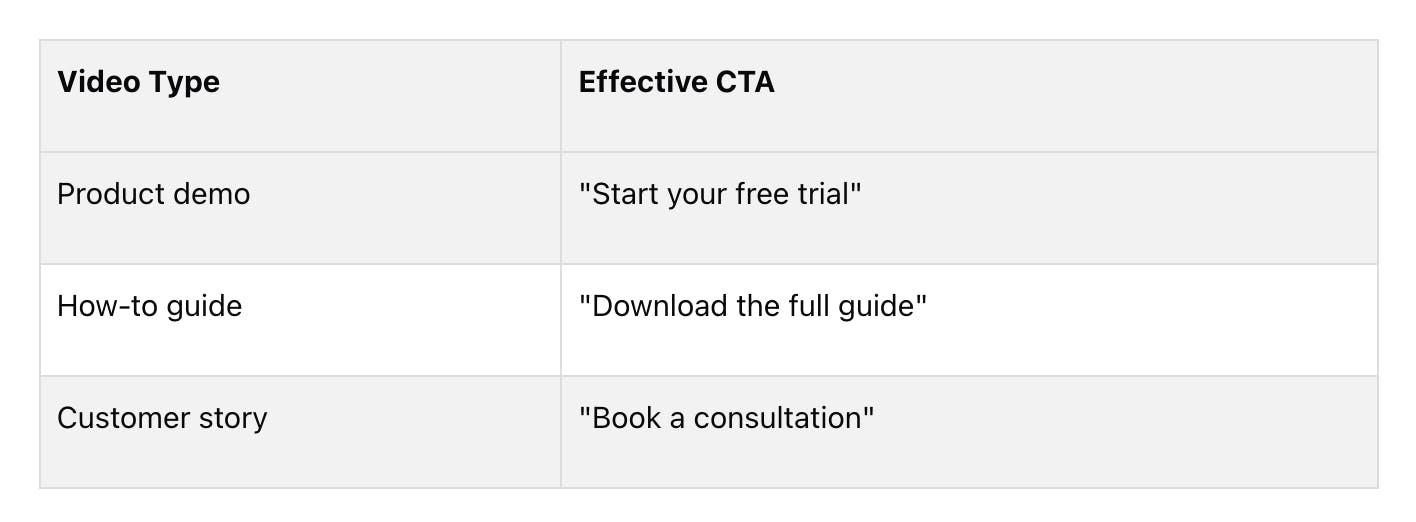
Test, rinse, repeat
Try different CTAs. Track what works. Adjust. Repeat.
"The average video click-through rate on video CTAs is 3.21%." - Vidyard
Want to beat that? Try these:
- Use in-video CTAs
- Customize your CTA text
- Make buttons pop visually
6. Make Videos Work on Phones
Most people check emails on their phones. If your video doesn't work on mobile, you're missing out.
Here's why it matters:
- 58%+ of website traffic comes from mobile devices
- Mobile video consumption doubles yearly
How to make videos shine on small screens:
1. Keep it short
Aim for:
- 15-30 seconds (social media)
- Under 60 seconds (sales outreach)
- 2 minutes max (most marketing videos)
2. Format for vertical viewing
Use these aspect ratios:
- 9:16 (full-screen vertical)
- 4:5 (square, good for Facebook/Instagram)
3. Hook viewers fast
You have 3 seconds. Start with your main message or eye-catching visual.
4. Design for silent viewing
80% watch without sound. Make your video work silently:
- Add captions
- Use on-screen text
- Include visual cues
5. Optimize video quality
Netflix compressed videos for mobile, resulting in:
- 40% more app downloads
- 35% higher engagement
6. Make interaction easy
People use fingers, not mice. Make buttons and links tap-friendly:
- CTA buttons: At least 44x44 pixels
- Leave space around clickable elements
7. Choose the right format
Different email clients support different formats:
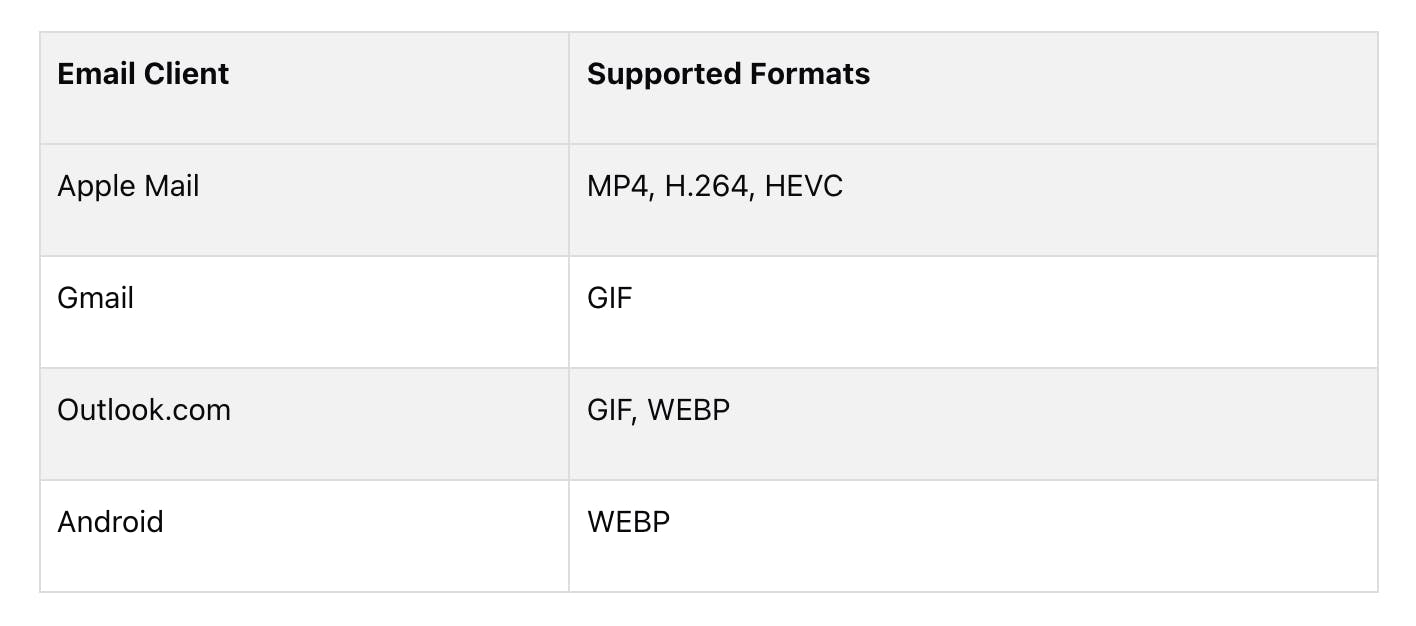
Pro tip: Use a service like Viewed or Playable to create multiple versions automatically. This shows the best format to each recipient based on their device and email client.
7. Check Results and Improve
Want better video email results? Track, test, and tweak. Here's how:
Monitor Key Metrics
Keep an eye on these numbers:
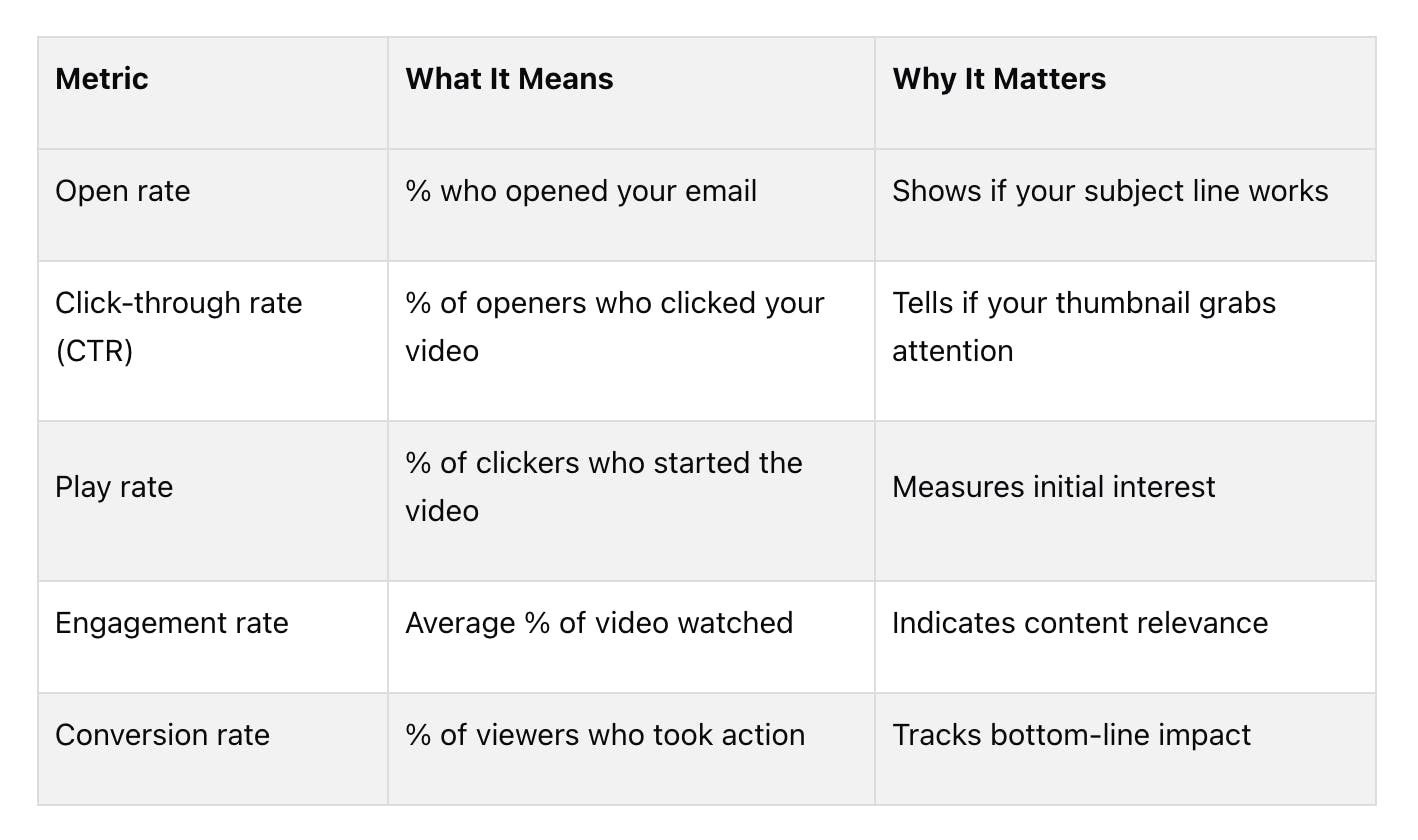
Compare and Test
- See how emails with videos stack up against those without. Whisker saw a 107% boost in conversions and 112% more revenue with consistent video messaging.
- A/B test one thing at a time:
- Subject lines (with/without "Video")
- Video thumbnails
- Video length
- CTA placement
River Island nailed this. They sent fewer emails but got better results:
- 30.9% more revenue per email
- 30.7% more orders per email
- 22.5% fewer emails sent overall
Dig Deeper
- Check where viewers drop off. If engagement dips at a certain point, your content might need work.
- Use what you learn:
- Videos too long? Shorten them.
- Low click-through rates? Tweak your CTAs.
- Open rates down? Rethink your subject lines.
- Link your video platform to your marketing and CRM tools. This shows how video engagement affects leads and sales.
Gordian did this with Vidyard, Marketo, and Salesforce. Their five-video campaign? $6 million in revenue by guiding prospects through the buyer's journey.
Remember: Always be testing, learning, and improving. Your video emails will thank you.
Wrap-up
Video emails pack a punch. Here's why:
- 19% more opens with "video" in the subject line
- 2-3x more clicks on video content vs. plain text
- 109% more conversions on pages with video
What works:
- Keep it under 60 seconds
- Tell a story
- Show, don't tell
Real results:
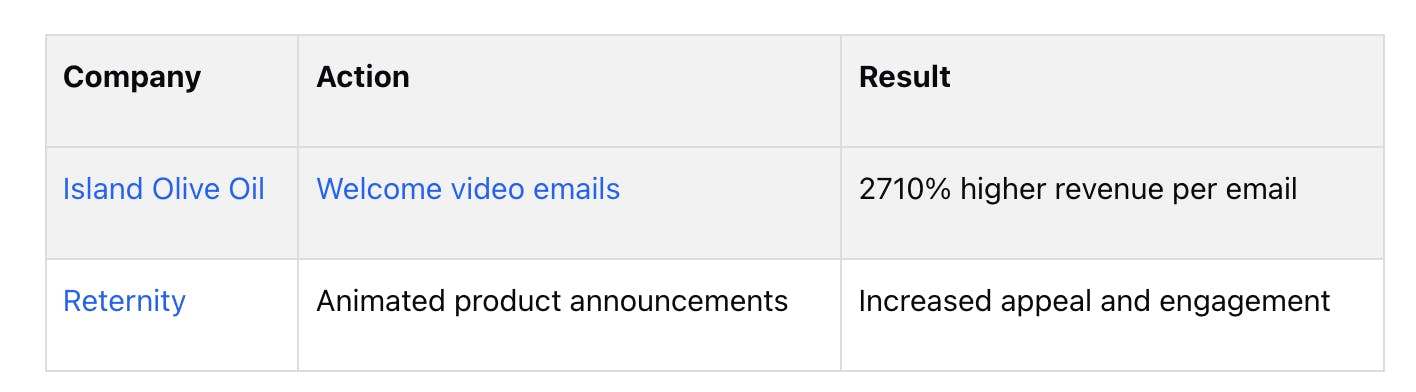
Start small:
1. Add videos to key emails (welcome series, product launches)
2. Track results (opens, clicks, conversions)
3. Adjust and expand based on what works
The bottom line? Video emails engage viewers, simplify ideas, and drive action. Why wait? Press play on your strategy today.
FAQs
How might you best use video in an email answer?
Video in emails can boost your marketing. Here's how:
- Add "video" to your subject line. It can bump up opens by 19%.
- Make custom videos for different groups. It feels personal.
- Use video to show company culture or announce events. It beats plain text.
- Keep it short - 30-60 seconds. People stay focused, and it loads faster.
- Use a play button on a static image to link to your video. It's simple and effective.
- If you want more site or YouTube traffic, don't embed the full video in the email.
- Watch your click-through rates. Videos can boost them by up to 96%.
But remember: video isn't magic. As Crisp says, "You can't force people to engage with something just because it's put in front of them." Make sure your video adds value.
Video Email Strategy
Potential Impact